Object Files & ELF
In the previous post, we established that main is a lie and the kernel needs to know
exactly how to set up memory before your program can run a single instruction.
But how does the kernel know what to load? If I give the kernel a binary file, how does it know
which part is code (executable), which part is data (readable/writable), and where the entry point
(_start) is located?
It needs a map. It needs a standard file format.
The Container
If you compile code with gcc hello_world.c, you get an a.out file. This is an Object File.
It contains your machine code, sure, but it also contains a lot of metadata:
- Symbols: Names of functions and variables (
mainis at offset0x123,printfis undefined)
- Data: Hardcoded strings like "Hello World" and values of (global) variables
- Relocations: The "To-Do" list we talked about last time ("Add the load address to the value at offset
0x40") - Debug Info: Which machine instruction corresponds to which line of C code (optional, but nice to have)
And most crucially metadata on how to actually load this file into memory.
There are many formats for this. Windows uses PE/COFF, macOS uses Mach-O, and Linux (and the BSDs, and many others) uses ELF (Executable and Linkable Format).
They all solve the same problems, but since we are writing a loader for Linux later, we are going to focus on ELF.
The ELF Header
Every ELF file starts with a header. It’s the first 64 bytes of the file. You can see it with
readelf -h a.out.
 1ELF Header:
 2  Magic:   7f 45 4c 46 02 01 01 00 00 00 00 00 00 00 00 00
 3  Class:                             ELF64
 4  Data:                              2's complement, little endian
 5  Version:                           1 (current)
 6  OS/ABI:                            UNIX - System V
 7  ABI Version:                       0
 8  Type:                              EXEC (Executable file)
 9  Machine:                           Advanced Micro Devices X86-64
10  Version:                           0x1
11  Entry point address:               0x400380
12  Start of program headers:          64 (bytes into file)
13  Start of section headers:          10528 (bytes into file)
14  Flags:                             0x0
15  Size of this header:               64 (bytes)
16  Size of program headers:           56 (bytes)
17  Number of program headers:         13
18  Size of section headers:           64 (bytes)
19  Number of section headers:         32
20  Section header string table index: 31
It starts with the magic bytes: 7f 45 4c 46 (the last three are ASCII for ELF). If these bytes
aren't there, the kernel (and later our loader) will refuse to run it.
It also tells us about the architecture (Advanced Micro Devices X86-64). If you try to run this
on an ARM processor, the loader checks this field and stops immediately.
Crucially, it also contains the Entry Point address (e_entry). This is the address of _start.
Once we are done loading, this is where we jump.
The Dual Nature of ELF
The coolest thing about ELF is that it has a split personality. It presents two completely different views of the data depending on who is looking at it: the Linker or the Loader.
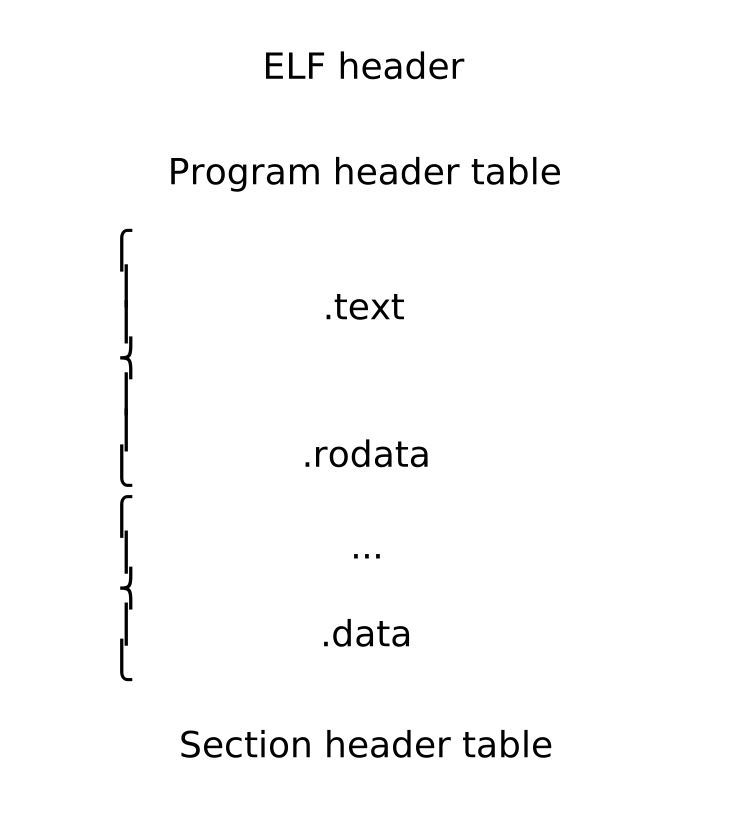
The Linker View: Sections
When you are compiling code, you care about logical separation. You want your code in .text, your
read-only strings in .rodata, your initialized variables in .data, and your uninitialized
ones in .bss. The linker needs this granularity to merge multiple object files together.
You can see these in the "Section Headers" (readelf -S), but the OS loader doesn't care about
sections. It ignores them completely. You can strip the section headers out of an executable (using
the strip command) and it will still run perfectly.
There are 32 section headers, starting at offset 0x2920:

Section Headers:
  [Nr] Name              Type             Address           Offset
       Size              EntSize          Flags  Link  Info  Align
  [ 0]                   NULL             0000000000000000  00000000
       0000000000000000  0000000000000000           0     0     0
  [...]
  [ 4] .text             PROGBITS         0000000000400380  00000380
       0000000000000106  0000000000000000  AX       0     0     16
  [...]
  [14] .rodata           PROGBITS         0000000000401168  00001168
       000000000000001d  0000000000000000   A       0     0     8
  [...]
  [24] .data             PROGBITS         0000000000403008  00002008
       0000000000000004  0000000000000000  WA       0     0     1
  [25] .bss              NOBITS           000000000040300c  0000200c
       0000000000000004  0000000000000000  WA       0     0     1
  [...]
  [29] .symtab           SYMTAB           0000000000000000  00002300
       0000000000000330  0000000000000018          30    18     8
  [30] .strtab           STRTAB           0000000000000000  00002630
       00000000000001b0  0000000000000000           0     0     1
Key to Flags:
  W (write), A (alloc), X (execute) ...
The Loader View: Segments
The OS loader instead cares about Memory Permissions.
The hardware Memory Management Unit (MMU) works in pages (usually 4KB). It can make a page readable, writable, executable, or a combination thereof. To be efficient, the loader wants to group similar sections together into big chunks called Segments.
This grouping is described in the Program Header Table of the ELF file.
The Program Headers
If you run readelf -l a.out, you see the instructions the kernel follows to run your program.
 1Elf file type is EXEC (Executable file)
 2Entry point 0x400380
 3There are 13 program headers, starting at offset 64
 4
 5Program Headers:
 6  Type           Offset             VirtAddr           PhysAddr
 7                 FileSiz            MemSiz              Flags  Align
 8  PHDR           0x0000000000000040 0x0000000000400040 0x0000000000400040
 9                 0x00000000000002d8 0x00000000000002d8  R      0x8
10  INTERP         0x0000000000001000 0x0000000000401000 0x0000000000401000
11                 0x000000000000001c 0x000000000000001c  R      0x1
12      [Requesting program interpreter: /lib64/ld-linux-x86-64.so.2]
13  LOAD           0x0000000000000000 0x0000000000400000 0x0000000000400000
14                 0x0000000000000495 0x0000000000000495  R E    0x1000
15  LOAD           0x0000000000001000 0x0000000000401000 0x0000000000401000
16                 0x00000000000002a8 0x00000000000002a8  R      0x1000
17  LOAD           0x0000000000001df8 0x0000000000402df8 0x0000000000402df8
18                 0x0000000000000214 0x0000000000000218  RW     0x1000
19  DYNAMIC        0x0000000000001e08 0x0000000000402e08 0x0000000000402e08
20                 0x00000000000001d0 0x00000000000001d0  RW     0x8
21  [...]
The PT_LOAD segments are the most important. They tell the loader: "Take FileSiz bytes from the
file at Offset and copy them to VirtAddr in memory."
Let's look at the three LOAD segments in this example.
The Code Segment (R E) contains the ELF Header, the Program Headers, and sections like .init,
.plt, and .text. It is not writable. This is a security feature to prevent self-modifying
code or injection attacks.
The Read-Only Data Segment (R) contains .rodata (the "Hello World" string) and .eh_frame (for
exception handling). In the past, this was often bundled with the executable segment. Modern linkers
split it out to strictly enforce "W^X" (Write XOR Execute).
Memory should never be both writable and executable, and data shouldn't be executable.
The Data Segment (RW) contains global variables .data and .bss. This is the only part of the
program that can change during execution.
The .bss Trick
Take a closer look at that third LOAD segment (the RW one):
1  Type           Offset             VirtAddr           PhysAddr
2                 FileSiz            MemSiz              Flags  Align
3  [...]
4  LOAD           0x0000000000001df8 0x0000000000402df8 0x0000000000402df8
5                 0x0000000000000214 0x0000000000000218  RW     0x1000
6  [...]
The Memory Size (0x218) is larger than the File Size (0x214). The difference is 4 bytes.
What goes in those extra 4 bytes? Zeroes.
This is how ELF handles uninitialized global variables (the .bss section). If you declare int big_array[1000000], we don't want to store a million zeros on your hard drive. That would be
wasteful.
Instead, the ELF file simply says: "This segment is bigger in RAM than it is on disk. Please fill the rest with zeros." When we write our loader, we must remember to zero-initialize this padding, or our program will start with garbage data in its variables.
The Plan
We now have the theory down. To load a program, we must:
- Read the ELF Header to verify the file and find the entry point.
- Read the Program Headers to find the
LOADsegments. - Mmap those segments into memory at the specified
VirtAddrwith the specified permissions. - Zero-fill the difference between
FileSizandMemSizfor the.bsssection. - Jump to the entry point.
In the next post, we will put this into practice. We will write a user-space loader in Zig that performs these exact steps to run a Linux executable.